
python版微信跳一跳游戏辅助
本文实例为大家分享了微信跳一跳游戏辅助python代码,供大家参考,具体内容如下
import os
import PIL
import numpy
import matplotlib

matplotlib.use('TKAgg')
import matplotlib.pyplot as plt
import time

from matplotlib.animation import FuncAnimation

# 是否需要进行图片更新
need_update = True

def get_screen_image():
 # 截取手机当前图片
 os.system('adb shell screencap -p /sdcard/screen.png')
 # 拉取到PC端
 os.system('adb pull /sdcard/screen.png')
 # 将图像转成数组返回
 return numpy.array(PIL.Image.open('screen.png'))

def jump_to_next(point1, point2):
 x1, y1 = point1;
 x2, y2 = point2
 distance = ((x2 - x1) ** 2 + (y2 - y1) ** 2) ** 0.5
 # 计算按压指令和按压时长
 os.system("adb shell input touchscreen swipe 320 410 320 410 %d" % (distance * 1.35))

def on_clack(event, coor=[]):
 global need_update
 coor.append((event.xdata, event.ydata))
 if len(coor) == 2:
 # 执行跳步指令
 jump_to_next(coor.pop(), coor.pop())
 # 进行图片刷新
 need_update = True

def update_screen(frame):
 global need_update
 if need_update:
 time.sleep(2)
 axes_image.set_array(get_screen_image())
 # 已刷新,设置为false
 need_update = False
 return axes_image,

figure = plt.figure()
axes_image = plt.imshow(get_screen_image(), animated=True)
figure.canvas.mpl_connect('button_press_event', on_clack)
# 定时更新
ani = FuncAnimation(figure, update_screen, interval=50, blit=True)
plt.show()
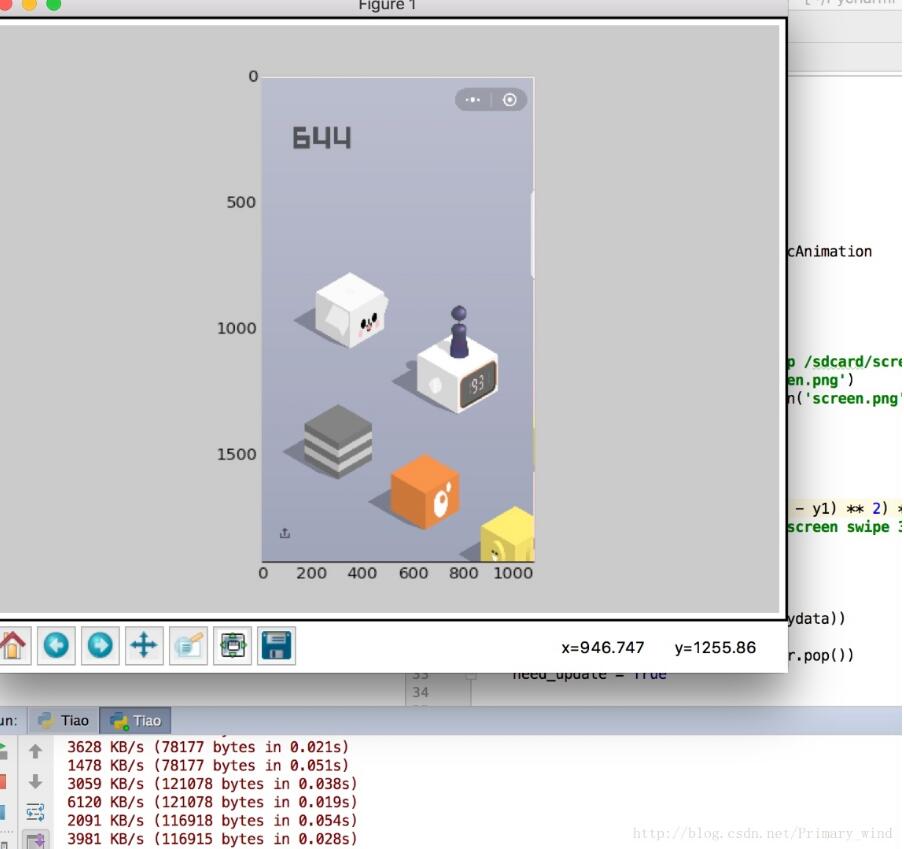
更多内容大家可以参考专题《微信跳一跳》进行学习。
以上就是本文的全部内容,希望对大家的学习有所帮助,也希望大家多多支持我们。
您可能感兴趣的文章:
- 微信跳一跳python自动代码解读1.0
- 微信跳一跳python辅助脚本(总结)
- 小米5s微信跳一跳小程序python源码
- 微信跳一跳自动运行python脚本
- 分数霸榜! python助你微信跳一跳拿高分
- 微信跳一跳游戏python脚本
- 微信跳一跳小游戏python脚本
- 微信跳一跳辅助python代码实现
- 微信跳一跳python代码实现
- Python+OpenCV让电脑帮你玩微信跳一跳
- 微信跳一跳python辅助软件思路及图像识别源码解析
- python实现微信跳一跳辅助工具步骤详解
- 教你用 Python 实现微信跳一跳(Mac+iOS版)
- python微信跳一跳游戏辅助代码解析
相关推荐
-
分数霸榜! python助你微信跳一跳拿高分
前言 最近微信的跳一跳很火,大家看到排行榜上几百上千的分数,再看看自己百分左右的分数肯定很难过,我手残怪我吗?没关系,如果你跟着我来,也能让你分数霸榜. 原理 首先大家是有一个直观感受,根据两个箱子距离的不同,需要按压的时间也是不一样的,一般来说,一个大胆的猜测是按压时间和距离是成正比的. 这是我们的工作原理: 在跳一跳页面截图 计算出初始点和终点的距离 想办法测出距离与按压时间的系数 想办法让手机按压指定的时间 重复1-4 工具 adb调试工具,它可以辅助截图以及上传截图给电脑,以及控制手机按
-
微信跳一跳python自动代码解读1.0
微信跳一跳自动代码,具体内容如下 那个跳一跳python"外挂",有几个python文件,其中有一个是得到截图,然后鼠标在图片上点击两次,python窗口上会打印两次鼠标的位置,并且会跟上一行这两个点之间的距离. 这个功能我先给除去获取截屏,就说怎么在某张图片上算出两次点击的距离. 首先,需要用到图形模块,PIL: from PIL import Image img = Image.open('0.jpg') 然后用图形绘制模块matplotlib来给出一个plot对象: import
-
Python+OpenCV让电脑帮你玩微信跳一跳
前言 最近微信小游戏跳一跳大热,自己也是中毒颇久,无奈手残最高分只拿到200分.无意间看到教你用Python来玩微信跳一跳一文,在电脑上利用adb驱动工具操作手机,详细的介绍以及如何安装adb驱动可以去看这篇文章,这里就不再介绍了.但是原文每次跳跃需要手动点击,于是想尝试利用图像处理的方法自动化. 最重要的不是最终刷的分数,而是解决这个问题的过程.花了一个下午尝试各种方法,最终采用opencv的模板匹配+边缘检测,方法很简单但效果很好. 本文主要分享如何用Opencv对游戏截图进行检测,自动找到
-

微信跳一跳小游戏python脚本
Python编写微信小游戏"跳一跳"的运行脚本,分享给大家. 更新了微信后发现了一款小游戏跳一跳,但是玩了一下午最高才达到200,每次差点破纪录后总是手抖就挂掉了,气的想要砸手机.闲来无事刷微博的时候正好看到有人分析如何编写脚本自动运行游戏破了3000多分,细看后觉得原理并不复杂,就索性花了一个晚上,参考大神的实现方法,在他的基础上删减了一些代码,也用Python写了个脚本.接下来进行原理和代码分析. 图1.跳一跳启动界面 原理 配置adb环境变量,在我的电脑–>属性–>高
-
微信跳一跳游戏python脚本
微信更新后出来了一块比较火的小游戏,要是一款不涉及到排行的游戏,可能 没人去关注这款游戏.最开自己一直苦练技术,想在微信排行上面装一装,练了好久才跑三百多分.接着在Github(Github地址:https://github.com/wangshub/wechat_jump_game),有一个大神发布了,一个Python脚本自动跳,分数随便跳,当然分数不要太高,分数太高了,微信是不会把分数录上去了,在好友排行刷个第一名还是可以的. 这个大神已经讲了关于安装的过程,大家可以去参考一下,不过有些地方
-
微信跳一跳自动运行python脚本
本文实例为大家分享了微信小程序跳一跳自动运行脚本,供大家参考,具体内容如下 1.压缩包带了adb等必须工具,配置一下环境变量即可 2.Python 直接运行即可 (Python3.6) 代码: wechat_jump_auto.py # coding: utf-8 ''' # === 思路 === # 核心:每次落稳之后截图,根据截图算出棋子的坐标和下一个块顶面的中点坐标, # 根据两个点的距离乘以一个时间系数获得长按的时间 # 识别棋子:靠棋子的颜色来识别位置,通过截图发现最下面一行大概是一条
-
小米5s微信跳一跳小程序python源码
本文实例为大家分享了微信跳一跳小程序python源码,供大家参考,具体内容如下 微信跳一跳小程序小米5s源码python,搭建环境后亲测可用. # coding: utf-8 import os import sys import subprocess import shutil import time import math from PIL import Image, ImageDraw import random import json import re # === 思路 === # 核
-
教你用 Python 实现微信跳一跳(Mac+iOS版)
这几天看网上好多微信跳一跳破解了,不过都是安卓的,无奈苹果不是开源也没办法.这个教程是 Mac + iOS , 要下xcode 要配置环境小白估计是没戏了,有iOS 开发经验的可以看看 .不过其实可以没事帮同事刷一下,让他们请吃个饭什么的,哈哈. 先发个战果 一.WebDriverAgent 首先去 https://github.com/facebook/WebDriverAgent 下一份代码 选择 WebDriverAgentRunner 用真机 然后 test 运行一下 , 看到IP地址就
-
微信跳一跳python辅助脚本(总结)
这段时间微信跳一跳这个游戏非常火爆,但是上分又非常的难,对于程序员来说第一个念头就是通过写一个辅助脚本外挂让上分变的容易,python现在比较火,我们一起来以python语言为基础总结以下各路神仙写的关于跳一跳的辅助脚本,大家在学习的时候主要理解他们的写法思路,对你学习python非常的有帮助. 1.微信跳一跳自动运行python脚本 注解:思路 核心:每次落稳之后截图,根据截图算出棋子的坐标和下一个块顶面的中点坐标, 根据两个点的距离乘以一个时间系数获得长按的时间 识别棋子:靠棋子的颜色来识别
-
微信跳一跳python辅助软件思路及图像识别源码解析
本文将梳理github上最火的wechat_jump_game的实现思路,并解析其图像处理部分源码 首先废话少说先看效果 核心思想 获取棋子到下一个方块的中心点的距离 计算触摸屏幕的时间 点击屏幕 重要方法 计算棋子到下一个方块中心点的距离 使用 adb shell screencap -p 命令获取手机当前屏幕画面 再通过图像上的信息找出棋子的坐标和下一个方块中心点的坐标 然后通过两点间距离公式计算出距离 计算触摸屏幕的时间 T=A * S 其中S为上步算出的像素距离,T为按压时间(ms),A
-
微信跳一跳辅助python代码实现
微信跳一跳辅助的python具体实现代码,供大家参考,具体内容如下 这是一个 2.5D 插画风格的益智游戏,玩家可以通过按压屏幕时间的长短来控制这个「小人」跳跃的距离.可能刚开始上手的时候,因为时间距离之间的关系把握不恰当,只能跳出几个就掉到了台子下面. 玩法类似于<flappy bird> 下载github的一个程序,但是在windows10下不能运行,原因是windows10下没有copy命令了,修改为Python自带的复制方法,即可完成.今天运行好像一开始不能正确跳第一次,人工辅助后,后
-
微信跳一跳python代码实现
本文实例为大家分享了python微信跳一跳的具体代码,供大家参考,具体内容如下 部分代码分享: wechat_jump.py from __future__ import print_function import numpy as np import matplotlib.pyplot as plt import matplotlib.animation as animation import math import time import os import cv2 import datet
-
python微信跳一跳游戏辅助代码解析
这个代码实现的是 手动点击起点 和 终点 ,程序自动判断距离.触屏时间 完成跳跃 原理(摘自项目说明页面): 1. 将手机点击到"跳一跳"小程序界面: 2. 用Adb 工具获取当前手机截图,并用adb将截图pull上来: adb shell screencap -p /sdcard/1.png adb pull /sdcard/1.png . 3. 用matplot显示截图: 4. 用鼠标点击起始点和目标位置,计算像素距离: 5. 根据像素距离,计算按压时间: 6. 用Adb工
-
python实现微信跳一跳辅助工具步骤详解
说明 1.windows上安装安卓模拟器,安卓版本5.1以上 2.模拟器里下载安装最新的微信6.6.1 3.最好使用python2.7,python3的pyhook包有bug,解决比较麻烦 步骤 1.windows上安装python2.7,配置好环境变量和pip 2.到这个网站下载对应版本的pyHook和pywin32 http://www.lfd.uci.edu/~gohlke/pythonlibs 2.打开cmd,安装下载好的whl文件和其他库 pip install pywin32-221