
python实现单机五子棋
简介
这是实验室2018年底招新时的考核题目,使用Python编写一个能够完成基本对战的五子棋游戏。面向新手。
程序主要包括两个部分,图形创建与逻辑编写两部分。
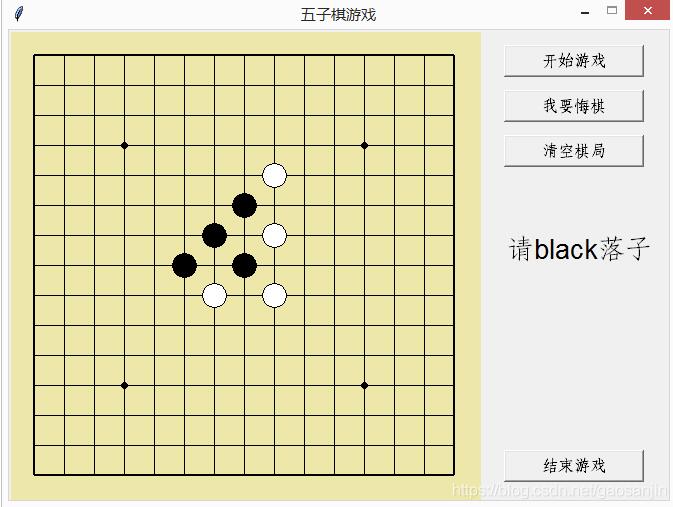
程序的运行结果:
样式创建
老规矩,先把用到的包导入进来。
'''
@Auther : gaoxin
@Date : 2019.01.01
@Version : 1.0
'''

from tkinter import *
import math
然后建立一个样式的类,类名称chessBoard。这里加了很多注释,避免新手看不懂函数的作用,说实话我觉得挺别扭的。
#定义棋盘类
class chessBoard() :
 def __init__(self) :
  #创建一个tk对象,即窗口
  self.window = Tk()
  #窗口命名
  self.window.title("五子棋游戏")
  #定义窗口大小
  self.window.geometry("660x470")
  #定义窗口不可放缩
  self.window.resizable(0,0)
  #定义窗口里的画布
  self.canvas=Canvas(self.window , bg="#EEE8AC" , width=470, height=470)
  #画出画布内容
  self.paint_board()
  #定义画布所在的网格
  self.canvas.grid(row = 0 , column = 0)

 def paint_board(self) :
  #画横线
  for row in range(0,15) :
   if row == 0 or row == 14 :
    self.canvas.create_line(25 , 25+row*30 , 25+14*30 , 25+row*30 , width = 2)
   else :
    self.canvas.create_line(25 , 25+row*30 , 25+14*30 , 25+row*30 , width = 1)

  #画竖线
  for column in range(0,15) :
   if column == 0 or column == 14 :
    self.canvas.create_line(25+column*30 ,25, 25+column*30 , 25+14*30 ,width = 2)
   else :
    self.canvas.create_line(25+column*30 ,25, 25+column*30 , 25+14*30 , width = 1)

  #画圆
  self.canvas.create_oval(112, 112, 118, 118, fill="black")
  self.canvas.create_oval(352, 112, 358, 118, fill="black")
  self.canvas.create_oval(112, 352, 118, 358, fill="black")
  self.canvas.create_oval(232, 232, 238, 238, fill="black")
  self.canvas.create_oval(352, 352, 358, 358, fill="black")
逻辑编写
这里的主要看每个函数的功能就好了。
#定义五子棋游戏类
#0为黑子 , 1为白子 , 2为空位
class Gobang() :
 #初始化
 def __init__(self) :
  self.board = chessBoard()
  self.game_print = StringVar()
  self.game_print.set("")
  #16*16的二维列表,保证不会out of index
  self.db = [([2] * 16) for i in range(16)]
  #悔棋用的顺序列表
  self.order = []
  #棋子颜色
  self.color_count = 0
  self.color = 'black'
  #清空与赢的初始化,已赢为1,已清空为1
  self.flag_win = 1
  self.flag_empty = 1
  self.options()

 #黑白互换
 def change_color(self) :
  self.color_count = (self.color_count + 1 ) % 2
  if self.color_count == 0 :
   self.color = "black"
  elif self.color_count ==1 :
   self.color = "white"

 #落子
 def chess_moving(self ,event) :
  #不点击“开始”与“清空”无法再次开始落子
  if self.flag_win ==1 or self.flag_empty ==0 :
   return
  #坐标转化为下标
  x,y = event.x-25 , event.y-25
  x = round(x/30)
  y = round(y/30)
  #点击位置没用落子,且没有在棋盘线外,可以落子
  while self.db[y][x] == 2 and self.limit_boarder(y,x):
   self.db[y][x] = self.color_count
   self.order.append(x+15*y)
   self.board.canvas.create_oval(25+30*x-12 , 25+30*y-12 , 25+30*x+12 , 25+30*y+12 , fill = self.color,tags = "chessman")
   if self.game_win(y,x,self.color_count) :
    print(self.color,"获胜")
    self.game_print.set(self.color+"获胜")
   else :
    self.change_color()
    self.game_print.set("请"+self.color+"落子")

 #保证棋子落在棋盘上
 def limit_boarder(self , y , x) :
  if x<0 or x>14 or y<0 or y>14 :
   return False
  else :
   return True

 #计算连子的数目,并返回最大连子数目
 def chessman_count(self , y , x , color_count ) :
  count1,count2,count3,count4 = 1,1,1,1
  #横计算
  for i in range(-1 , -5 , -1) :
   if self.db[y][x+i] == color_count :
    count1 += 1
   else:
    break
  for i in range(1 , 5 ,1 ) :
   if self.db[y][x+i] == color_count :
    count1 += 1
   else:
    break
  #竖计算
  for i in range(-1 , -5 , -1) :
   if self.db[y+i][x] == color_count :
    count2 += 1
   else:
    break
  for i in range(1 , 5 ,1 ) :
   if self.db[y+i][x] == color_count :
    count2 += 1
   else:
    break
  #/计算
  for i in range(-1 , -5 , -1) :
   if self.db[y+i][x+i] == color_count :
    count3 += 1
   else:
    break
  for i in range(1 , 5 ,1 ) :
   if self.db[y+i][x+i] == color_count :
    count3 += 1
   else:
    break
  #\计算
  for i in range(-1 , -5 , -1) :
   if self.db[y+i][x-i] == color_count :
    count4 += 1
   else:
    break
  for i in range(1 , 5 ,1 ) :
   if self.db[y+i][x-i] == color_count :
    count4 += 1
   else:
    break

  return max(count1 , count2 , count3 , count4)

 #判断输赢
 def game_win(self , y , x , color_count ) :
  if self.chessman_count(y,x,color_count) >= 5 :
   self.flag_win = 1
   self.flag_empty = 0
   return True
  else :
   return False

 #悔棋,清空棋盘,再画剩下的n-1个棋子
 def withdraw(self ) :
  if len(self.order)==0 or self.flag_win == 1:
   return
  self.board.canvas.delete("chessman")
  z = self.order.pop()
  x = z%15
  y = z//15
  self.db[y][x] = 2
  self.color_count = 1
  for i in self.order :
   ix = i%15
   iy = i//15
   self.change_color()
   self.board.canvas.create_oval(25+30*ix-12 , 25+30*iy-12 , 25+30*ix+12 , 25+30*iy+12 , fill = self.color,tags = "chessman")
  self.change_color()
  self.game_print.set("请"+self.color+"落子")

 #清空
 def empty_all(self) :
  self.board.canvas.delete("chessman")
  #还原初始化
  self.db = [([2] * 16) for i in range(16)]
  self.order = []
  self.color_count = 0
  self.color = 'black'
  self.flag_win = 1
  self.flag_empty = 1
  self.game_print.set("")

 #将self.flag_win置0才能在棋盘上落子
 def game_start(self) :
  #没有清空棋子不能置0开始
  if self.flag_empty == 0:
   return
  self.flag_win = 0
  self.game_print.set("请"+self.color+"落子")

 def options(self) :
  self.board.canvas.bind("<Button-1>",self.chess_moving)
  Label(self.board.window , textvariable = self.game_print , font = ("Arial", 20) ).place(relx = 0, rely = 0 ,x = 495 , y = 200)
  Button(self.board.window , text= "开始游戏" ,command = self.game_start,width = 13, font = ("Verdana", 12)).place(relx=0, rely=0, x=495, y=15)
  Button(self.board.window , text= "我要悔棋" ,command = self.withdraw,width = 13, font = ("Verdana", 12)).place(relx=0, rely=0, x=495, y=60)
  Button(self.board.window , text= "清空棋局" ,command = self.empty_all,width = 13, font = ("Verdana", 12)).place(relx=0, rely=0, x=495, y=105)
  Button(self.board.window , text= "结束游戏" ,command = self.board.window.destroy,width = 13, font = ("Verdana", 12)).place(relx=0, rely=0, x=495, y=420)
  self.board.window.mainloop()
最后,main函数
if __name__ == "__main__":
 game = Gobang()
将以上的所有程序复制粘贴,即为完整的程序了,可以运行。
最后来一个完整程序,一个一个复制粘贴简直不要太麻烦。
'''
@Auther : gaoxin
@Date : 2019.01.01
@Version : 1.0

'''

from tkinter import *
import math

#定义棋盘类
class chessBoard() :
 def __init__(self) :
  self.window = Tk()
  self.window.title("五子棋游戏")
  self.window.geometry("660x470")
  self.window.resizable(0,0)
  self.canvas=Canvas(self.window , bg="#EEE8AC" , width=470, height=470)
  self.paint_board()
  self.canvas.grid(row = 0 , column = 0)

 def paint_board(self) :
  for row in range(0,15) :
   if row == 0 or row == 14 :
    self.canvas.create_line(25 , 25+row*30 , 25+14*30 , 25+row*30 , width = 2)
   else :
    self.canvas.create_line(25 , 25+row*30 , 25+14*30 , 25+row*30 , width = 1)
  for column in range(0,15) :
   if column == 0 or column == 14 :
    self.canvas.create_line(25+column*30 ,25, 25+column*30 , 25+14*30 ,width = 2)
   else :
    self.canvas.create_line(25+column*30 ,25, 25+column*30 , 25+14*30 , width = 1)

  self.canvas.create_oval(112, 112, 118, 118, fill="black")
  self.canvas.create_oval(352, 112, 358, 118, fill="black")
  self.canvas.create_oval(112, 352, 118, 358, fill="black")
  self.canvas.create_oval(232, 232, 238, 238, fill="black")
  self.canvas.create_oval(352, 352, 358, 358, fill="black")

#定义五子棋游戏类
#0为黑子 , 1为白子 , 2为空位
class Gobang() :
 #初始化
 def __init__(self) :
  self.board = chessBoard()
  self.game_print = StringVar()
  self.game_print.set("")
  #16*16的二维列表,保证不会out of index
  self.db = [([2] * 16) for i in range(16)]
  #悔棋用的顺序列表
  self.order = []
  #棋子颜色
  self.color_count = 0
  self.color = 'black'
  #清空与赢的初始化,已赢为1,已清空为1
  self.flag_win = 1
  self.flag_empty = 1
  self.options()

 #黑白互换
 def change_color(self) :
  self.color_count = (self.color_count + 1 ) % 2
  if self.color_count == 0 :
   self.color = "black"
  elif self.color_count ==1 :
   self.color = "white"

 #落子
 def chess_moving(self ,event) :
  #不点击“开始”与“清空”无法再次开始落子
  if self.flag_win ==1 or self.flag_empty ==0 :
   return
  #坐标转化为下标
  x,y = event.x-25 , event.y-25
  x = round(x/30)
  y = round(y/30)
  #点击位置没用落子,且没有在棋盘线外,可以落子
  while self.db[y][x] == 2 and self.limit_boarder(y,x):
   self.db[y][x] = self.color_count
   self.order.append(x+15*y)
   self.board.canvas.create_oval(25+30*x-12 , 25+30*y-12 , 25+30*x+12 , 25+30*y+12 , fill = self.color,tags = "chessman")
   if self.game_win(y,x,self.color_count) :
    print(self.color,"获胜")
    self.game_print.set(self.color+"获胜")
   else :
    self.change_color()
    self.game_print.set("请"+self.color+"落子")

 #保证棋子落在棋盘上
 def limit_boarder(self , y , x) :
  if x<0 or x>14 or y<0 or y>14 :
   return False
  else :
   return True

 #计算连子的数目,并返回最大连子数目
 def chessman_count(self , y , x , color_count ) :
  count1,count2,count3,count4 = 1,1,1,1
  #横计算
  for i in range(-1 , -5 , -1) :
   if self.db[y][x+i] == color_count :
    count1 += 1
   else:
    break
  for i in range(1 , 5 ,1 ) :
   if self.db[y][x+i] == color_count :
    count1 += 1
   else:
    break
  #竖计算
  for i in range(-1 , -5 , -1) :
   if self.db[y+i][x] == color_count :
    count2 += 1
   else:
    break
  for i in range(1 , 5 ,1 ) :
   if self.db[y+i][x] == color_count :
    count2 += 1
   else:
    break
  #/计算
  for i in range(-1 , -5 , -1) :
   if self.db[y+i][x+i] == color_count :
    count3 += 1
   else:
    break
  for i in range(1 , 5 ,1 ) :
   if self.db[y+i][x+i] == color_count :
    count3 += 1
   else:
    break
  #\计算
  for i in range(-1 , -5 , -1) :
   if self.db[y+i][x-i] == color_count :
    count4 += 1
   else:
    break
  for i in range(1 , 5 ,1 ) :
   if self.db[y+i][x-i] == color_count :
    count4 += 1
   else:
    break

  return max(count1 , count2 , count3 , count4)

 #判断输赢
 def game_win(self , y , x , color_count ) :
  if self.chessman_count(y,x,color_count) >= 5 :
   self.flag_win = 1
   self.flag_empty = 0
   return True
  else :
   return False

 #悔棋,清空棋盘,再画剩下的n-1个棋子
 def withdraw(self ) :
  if len(self.order)==0 or self.flag_win == 1:
   return
  self.board.canvas.delete("chessman")
  z = self.order.pop()
  x = z%15
  y = z//15
  self.db[y][x] = 2
  self.color_count = 1
  for i in self.order :
   ix = i%15
   iy = i//15
   self.change_color()
   self.board.canvas.create_oval(25+30*ix-12 , 25+30*iy-12 , 25+30*ix+12 , 25+30*iy+12 , fill = self.color,tags = "chessman")
  self.change_color()
  self.game_print.set("请"+self.color+"落子")

 #清空
 def empty_all(self) :
  self.board.canvas.delete("chessman")
  #还原初始化
  self.db = [([2] * 16) for i in range(16)]
  self.order = []
  self.color_count = 0
  self.color = 'black'
  self.flag_win = 1
  self.flag_empty = 1
  self.game_print.set("")

 #将self.flag_win置0才能在棋盘上落子
 def game_start(self) :
  #没有清空棋子不能置0开始
  if self.flag_empty == 0:
   return
  self.flag_win = 0
  self.game_print.set("请"+self.color+"落子")

 def options(self) :
  self.board.canvas.bind("<Button-1>",self.chess_moving)
  Label(self.board.window , textvariable = self.game_print , font = ("Arial", 20) ).place(relx = 0, rely = 0 ,x = 495 , y = 200)
  Button(self.board.window , text= "开始游戏" ,command = self.game_start,width = 13, font = ("Verdana", 12)).place(relx=0, rely=0, x=495, y=15)
  Button(self.board.window , text= "我要悔棋" ,command = self.withdraw,width = 13, font = ("Verdana", 12)).place(relx=0, rely=0, x=495, y=60)
  Button(self.board.window , text= "清空棋局" ,command = self.empty_all,width = 13, font = ("Verdana", 12)).place(relx=0, rely=0, x=495, y=105)
  Button(self.board.window , text= "结束游戏" ,command = self.board.window.destroy,width = 13, font = ("Verdana", 12)).place(relx=0, rely=0, x=495, y=420)
  self.board.window.mainloop()

if __name__ == "__main__":
 game = Gobang()
更多有趣的经典小游戏实现专题,分享给大家:
C++经典小游戏汇总
python经典小游戏汇总
python俄罗斯方块游戏集合
JavaScript经典游戏 玩不停
javascript经典小游戏汇总
以上就是本文的全部内容,希望对大家的学习有所帮助,也希望大家多多支持我们。
相关推荐
-
python pygame实现五子棋小游戏
今天学习了如何使用pygame来制作小游戏,下面是五子棋的代码,我的理解都写在注释里了 import pygame # 导入pygame模块 print(pygame.ver) # 检查pygame的版本,检查pygame有没有导入成功 EMPTY = 0 BLACK = 1 WHITE = 2 # 定义三个常量函数,用来表示白棋,黑棋,以及 空 black_color = [0, 0, 0] # 定义黑色(黑棋用,画棋盘) white_color = [255, 255, 255] # 定义白
-
python版本五子棋的实现代码
正文之前 前阵子做了个<人工智能> 的课程作业,然后写了个人工智障...大概就是个可以跟你下五子棋的傻儿子...下面是代码和效果 正文 1. 摘要 机器博弈是人工智能领域的重要分支,它的研究对象多以复杂的棋牌类智力游戏为主,已经得到解决的棋类游戏,几乎全部都应归功于机器博弈近半个世纪的发展.计算机解决问题的优势在于能把不易解析的问题,借助于现代计算机的运算速度优势枚举出所有的合理情形而得解;然而,博弈问题的复杂程度决定了它不能过度依赖机器的计算能力.许多待解决的或已经解决的棋类,其状态空间复杂
-
python制作简单五子棋游戏
本文实例为大家分享了python五子棋游戏的具体代码,供大家参考,具体内容如下 #五子棋 ''' 矩阵做棋盘 16*16 "+" 打印棋盘 for for 游戏是否结束 开始下棋 while 游戏是否结束: 黑白交替 player=0 p%2==0 ==1 p+=1 下棋动作一样 但是棋子不一样 ''' 代码 #创建棋盘的程序 def initBoard(): global board #调用全局的board board=[None]*16 for i in range(len(boa
-
python五子棋游戏的设计与实现
这个python的小案例是五子棋游戏的实现,在这个案例中,我们可以实现五子棋游戏的两个玩家在指定的位置落子,画出落子后的棋盘,并且根据函数判断出输赢的功能. 这个案例的思路如下所示: 首先,根据棋盘的样子画出棋盘 然后,对棋盘进行初始化,将可以落子的位置进行统一化处理 接下来,就是进入游戏的环节,双方轮流落子,落子后,并将棋盘画出 最后,根据落子的位置判断选手的的输赢情况,游戏结束 五子棋游戏的设计和实现 代码如下: def main(): print("五子棋游戏".center(5
-

python实现五子棋游戏
本文实例为大家分享了python实现五子棋游戏的具体代码,供大家参考,具体内容如下 话不多说,直接上代码: 全部工程文件,在GitHub:五子棋 效果预览: #!/usr/bin/env python3 #-*- coding:utf-8 -*- import pygame from pygame.locals import * from sys import exit import numpy background_image = 'qipan.png' white_image = 'whit
-
使用python实现简单五子棋游戏
用python实现五子棋简单人机模式的练习过程,供大家参考,具体内容如下 第一次写博客,我尽力把它写好. 最近在初学python,今天就用自己的一些粗浅理解,来记录一下这几天的python简单人机五子棋游戏的练习,下面是实现过程的理解(是在cmd中运行的): 主要流程: *重点内容* - 首先是模块及类的划分 - 棋子类和棋盘类的方法 - 对策略类里的功能进行细分,调用棋子类和棋盘类 - 写出判断输赢的方法 - 用main函数进行整个游戏进度的控制 模块及类的划分 类的划分涉及到了面向对象的内容
-
python实现五子棋小程序
本文实例为大家分享了python实现五子棋小程序的具体代码,供大家参考,具体内容如下 一.结合书上例子,分三段编写: wuziqi.py #coding:utf-8 from win_notwin import * from show_qipan import * maxx=10 #10行10列 maxy=10 qipan=[[0,0,0,0,1,0,0,2,0,0],[0,1,2,1,1,0,2,0,0,0],[0,0,0,0,1,1,0,2,0,0],[0,0,0,0,2,0,0,1,0,0
-
python实现五子棋小游戏
本文实例为大家分享了python实现五子棋小游戏的具体代码,供大家参考,具体内容如下 暑假学了十几天python,然后用pygame模块写了一个五子棋的小游戏,代码跟有缘人分享一下. import numpy as np import pygame import sys import traceback import copy from pygame.locals import * pygame.init() pygame.mixer.init() #颜色 background=(201,202
-
python实现简单五子棋游戏
本文实例为大家分享了python实现简单五子棋游戏的具体代码,供大家参考,具体内容如下 from graphics import * from math import * import numpy as np def ai(): """ AI计算落子位置 """ maxmin(True, DEPTH, -99999999, 99999999) return next_point[0], next_point[1] def maxmin(is_ai
-
python使用minimax算法实现五子棋
这是一个命令行环境的五子棋程序.使用了minimax算法. 除了百度各个棋型的打分方式,所有代码皆为本人所撸.本程序结构与之前的井字棋.黑白棋一模一样. 有一点小问题,没时间弄了,就这样吧. 一.效果图 (略) 二.完整代码 from functools import wraps import time import csv ''' 五子棋 Gobang 作者:hhh5460 时间:20181213 ''' #1.初始化棋盘 #------------ def init_board(): '''