
浅谈pandas关于查看库或依赖库版本的API原理
概述
pandas中与库版本或依赖库版本相关的API主要有以下4个:
pandas.__version__:查看pandas简要版本信息。pandas.__git_version__:查看pandasgit版本信息。pandas._version.get_versions():查看pandas详细版本信息。pandas.show_versions():查看pandas及其依赖库的版本信息。
上述API的运行效果如下:
In [1]: import pandas as pd
In [2]: pd.__version__
Out[2]: '1.1.3'In [3]: pd.__git_version__
Out[3]: 'db08276bc116c438d3fdee492026f8223584c477'In [4]: pd._version.get_versions()
Out[4]:
{'dirty': False,
'error': None,
'full-revisionid': 'db08276bc116c438d3fdee492026f8223584c477',
'version': '1.1.3'}In [5]: pd.show_versions(True)
{'system': {'commit': 'db08276bc116c438d3fdee492026f8223584c477', 'python': '3.7.2.final.0', 'python-bits': 64, 'OS': 'Windows', 'OS-release': '10', 'Version': '10.0.17763', 'machine': 'AMD64', 'processor': 'Intel64 Family 6 Model 94 Stepping 3, GenuineIntel', 'byteorder': 'little', 'LC_ALL': None, 'LANG': None, 'LOCALE': {'language-code': None, 'encoding': None}}, 'dependencies': {'pandas': '1.1.3', 'numpy': '1.20.1', 'pytz': '2019.2', 'dateutil': '2.8.0', 'pip': '19.3.1', 'setuptools': '51.1.0.post20201221', 'Cython': None, 'pytest': None, 'hypothesis': None, 'sphinx': None, 'blosc': None, 'feather': None, 'xlsxwriter': '3.0.1', 'lxml.etree': '4.4.2', 'html5lib': '1.1', 'pymysql': '0.9.3', 'psycopg2': None, 'jinja2': '2.11.2', 'IPython': '7.11.1', 'pandas_datareader': None, 'bs4': '4.9.3', 'bottleneck': None, 'fsspec': None, 'fastparquet': None, 'gcsfs': None, 'matplotlib': '3.4.1', 'numexpr': None, 'odfpy': None, 'openpyxl': '2.6.2', 'pandas_gbq': None, 'pyarrow': None, 'pytables': None, 'pyxlsb': None, 's3fs': None, 'scipy': '1.2.1', 'sqlalchemy': '1.4.18', 'tables': None, 'tabulate': None, 'xarray': None, 'xlrd': '1.2.0', 'xlwt': '1.3.0', 'numba': '0.52.0'}}
pandas._version.get_versions()、pandas.__version__和pandas.__git_version__原理
pandas._version.get_versions()
pandas._version.get_versions()源代码位于pandas包根目录下的_version.py。根据源码可知,该模块以JSON字符串形式存储版本信息,通过get_versions()返回字典形式的详细版本信息。
pandas/_version.py源码
from warnings import catch_warnings
with catch_warnings(record=True):
    import json
import sys

version_json = '''
{
 "dirty": false,
 "error": null,
 "full-revisionid": "db08276bc116c438d3fdee492026f8223584c477",
 "version": "1.1.3"
}
'''  # END VERSION_JSON

def get_versions():
    return json.loads(version_json)
pandas.__version__和pandas.__git_version__
pandas.__version__和pandas.__git_version__源代码位于pandas包根目录下的__init__.py。根据源码可知,pandas.__version__和pandas.__git_version__源自于pandas._version.get_versions()的返回值。
生成这两个之后,删除了get_versions、v两个命名空间,因此不能使用pandas.get_versions()或pandas.v形式查看版本信息。
相关源码:
from ._version import get_versions

v = get_versions()
__version__ = v.get("closest-tag", v["version"])
__git_version__ = v.get("full-revisionid")
del get_versions, v
pandas.show_versions()原理
根据pandas包根目录下的__init__.py源码可知,通过from pandas.util._print_versions import show_versions重构命名空间,pandas.show_versions()的源代码位于pandas包util目录下的_print_versions.py模块。
根据源码可知,pandas.show_versions()的参数取值有3种情况:
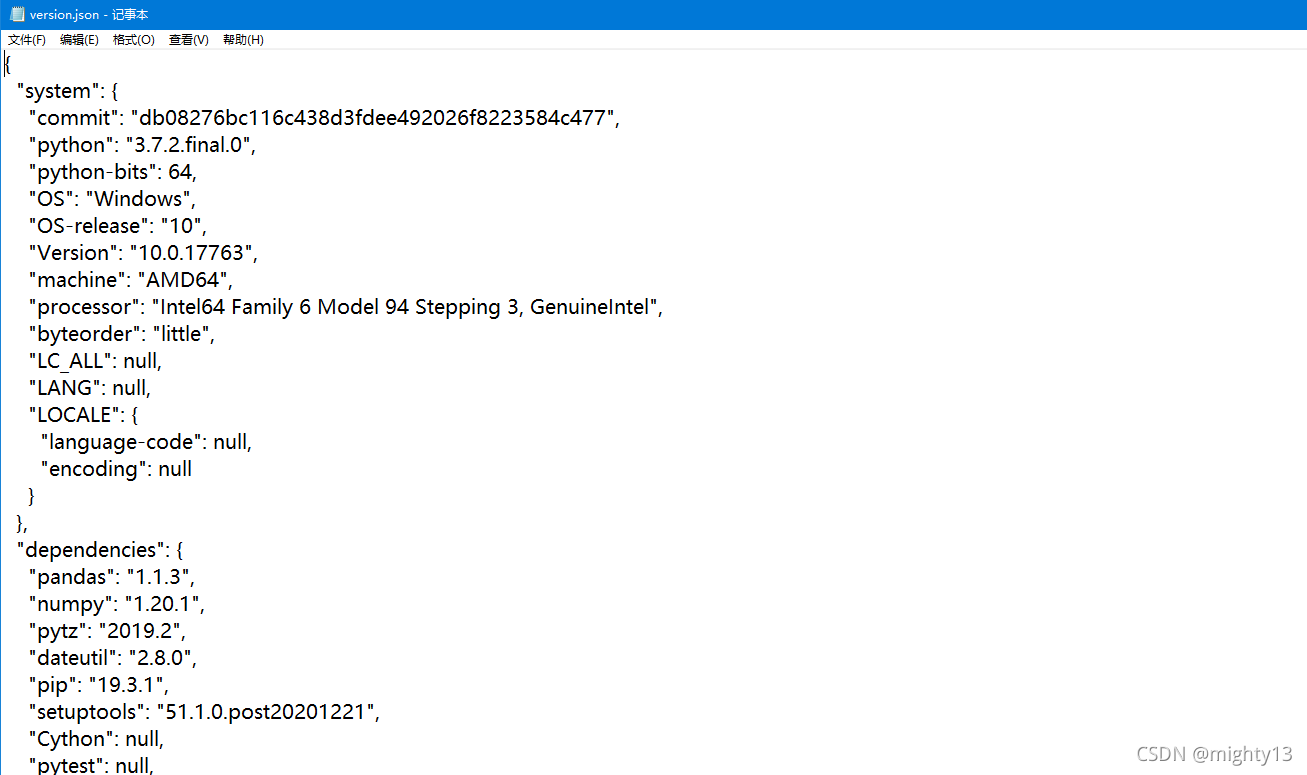
False:打印输出类表格形式的依赖库版本信息。True:打印输出JSON字符串形式的依赖库版本信息。字符串:参数被认为是文件路径,版本信息以JSON形式写入该文件。
注意!pandas.show_versions()没有返回值即None。
pandas.show_versions()不同参数输出结果
In [5]: pd.show_versions(True)
{'system': {'commit': 'db08276bc116c438d3fdee492026f8223584c477', 'python': '3.7.2.final.0', 'python-bits': 64, 'OS': 'Windows', 'OS-release': '10', 'Version': '10.0.17763', 'machine': 'AMD64', 'processor': 'Intel64 Family 6 Model 94 Stepping 3, GenuineIntel', 'byteorder': 'little', 'LC_ALL': None, 'LANG': None, 'LOCALE': {'language-code': None, 'encoding': None}}, 'dependencies': {'pandas': '1.1.3', 'numpy': '1.20.1', 'pytz': '2019.2', 'dateutil': '2.8.0', 'pip': '19.3.1', 'setuptools': '51.1.0.post20201221', 'Cython': None, 'pytest': None, 'hypothesis': None, 'sphinx': None, 'blosc': None, 'feather': None, 'xlsxwriter': '3.0.1', 'lxml.etree': '4.4.2', 'html5lib': '1.1', 'pymysql': '0.9.3', 'psycopg2': None, 'jinja2': '2.11.2', 'IPython': '7.11.1', 'pandas_datareader': None, 'bs4': '4.9.3', 'bottleneck': None, 'fsspec': None, 'fastparquet': None, 'gcsfs': None, 'matplotlib': '3.4.1', 'numexpr': None, 'odfpy': None, 'openpyxl': '2.6.2', 'pandas_gbq': None, 'pyarrow': None, 'pytables': None, 'pyxlsb': None, 's3fs': None, 'scipy': '1.2.1', 'sqlalchemy': '1.4.18', 'tables': None, 'tabulate': None, 'xarray': None, 'xlrd': '1.2.0', 'xlwt': '1.3.0', 'numba': '0.52.0'}}

In [6]: pd.show_versions()

INSTALLED VERSIONS
------------------
commit           : db08276bc116c438d3fdee492026f8223584c477
python           : 3.7.2.final.0
python-bits      : 64
OS               : Windows
OS-release       : 10
Version          : 10.0.17763
machine          : AMD64
processor        : Intel64 Family 6 Model 94 Stepping 3, GenuineIntel
byteorder        : little
LC_ALL           : None
LANG             : None
LOCALE           : None.None

pandas           : 1.1.3
numpy            : 1.20.1
pytz             : 2019.2
dateutil         : 2.8.0
pip              : 19.3.1
setuptools       : 51.1.0.post20201221
Cython           : None
pytest           : None
hypothesis       : None
sphinx           : None
blosc            : None
feather          : None
xlsxwriter       : 3.0.1
lxml.etree       : 4.4.2
html5lib         : 1.1
pymysql          : 0.9.3
psycopg2         : None
jinja2           : 2.11.2
IPython          : 7.11.1
pandas_datareader: None
bs4              : 4.9.3
bottleneck       : None
fsspec           : None
fastparquet      : None
gcsfs            : None
matplotlib       : 3.4.1
numexpr          : None
odfpy            : None
openpyxl         : 2.6.2
pandas_gbq       : None
pyarrow          : None
pytables         : None
pyxlsb           : None
s3fs             : None
scipy            : 1.2.1
sqlalchemy       : 1.4.18
tables           : None
tabulate         : None
xarray           : None
xlrd             : 1.2.0
xlwt             : 1.3.0
numba            : 0.52.0

In [7]: pd.show_versions("./version.json")
相关源码:
def show_versions(as_json: Union[str, bool] = False) -> None:
    """
    Provide useful information, important for bug reports.

    It comprises info about hosting operation system, pandas version,
    and versions of other installed relative packages.

    Parameters
    ----------
    as_json : str or bool, default False
        * If False, outputs info in a human readable form to the console.
        * If str, it will be considered as a path to a file.
          Info will be written to that file in JSON format.
        * If True, outputs info in JSON format to the console.
    """
    sys_info = _get_sys_info()
    deps = _get_dependency_info()

    if as_json:
        j = dict(system=sys_info, dependencies=deps)

        if as_json is True:
            print(j)
        else:
            assert isinstance(as_json, str)  # needed for mypy
            with codecs.open(as_json, "wb", encoding="utf8") as f:
                json.dump(j, f, indent=2)

    else:
        assert isinstance(sys_info["LOCALE"], dict)  # needed for mypy
        language_code = sys_info["LOCALE"]["language-code"]
        encoding = sys_info["LOCALE"]["encoding"]
        sys_info["LOCALE"] = f"{language_code}.{encoding}"

        maxlen = max(len(x) for x in deps)
        print("\nINSTALLED VERSIONS")
        print("------------------")
        for k, v in sys_info.items():
            print(f"{k:<{maxlen}}: {v}")
        print("")
        for k, v in deps.items():
            print(f"{k:<{maxlen}}: {v}")
到此这篇关于浅谈pandas关于查看库或依赖库版本的API原理的文章就介绍到这了,更多相关pandas 依赖库API内容请搜索我们以前的文章或继续浏览下面的相关文章希望大家以后多多支持我们!
相关推荐
-
Python数据分析库pandas基本操作方法
pandas是什么? 是它吗? ....很显然pandas没有这个家伙那么可爱.... 我们来看看pandas的官网是怎么来定义自己的: pandas is an open source, easy-to-use data structures and data analysis tools for the Python programming language. 很显然,pandas是python的一个非常强大的数据分析库! 让我们来学习一下它吧! 1.pandas序列 import nump
-
python pandas库中DataFrame对行和列的操作实例讲解
用pandas中的DataFrame时选取行或列: import numpy as np import pandas as pd from pandas import Sereis, DataFrame ser = Series(np.arange(3.)) data = DataFrame(np.arange(16).reshape(4,4),index=list('abcd'),columns=list('wxyz')) data['w'] #选择表格中的'w'列,使用类字典属性,返回的是S
-

Python数据分析库pandas高级接口dt的使用详解
Series对象和DataFrame的列数据提供了cat.dt.str三种属性接口(accessors),分别对应分类数据.日期时间数据和字符串数据,通过这几个接口可以快速实现特定的功能,非常快捷. 今天翻阅pandas官方文档总结了以下几个常用的api. 1.dt.date 和 dt.normalize(),他们都返回一个日期的 日期部分,即只包含年月日.但不同的是date返回的Series是object类型的,normalize()返回的Series是datetime64类型的. 这里先简单
-
详解pandas库pd.read_excel操作读取excel文件参数整理与实例
除了使用xlrd库或者xlwt库进行对excel表格的操作读与写,而且pandas库同样支持excel的操作:且pandas操作更加简介方便. 首先是pd.read_excel的参数:函数为: pd.read_excel(io, sheetname=0,header=0,skiprows=None,index_col=None,names=None, arse_cols=None,date_parser=None,na_values=None,thousands=None, convert_fl
-
python pandas库读取excel/csv中指定行或列数据
目录 引言 1.根据index查询 2.已知数据在第几行找到想要的数据 3.根据条件查询找到指定行数据 4.找出指定列 5.找出指定的行和指定的列 6.在规定范围内找出符合条件的数据 总结 引言 关键!!!!使用loc函数来查找. 话不多说,直接演示: 有以下名为try.xlsx表: 1.根据index查询 条件:首先导入的数据必须的有index 或者自己添加吧,方法简单,读取excel文件时直接加index_col 代码示例: import pandas as pd #导入pandas库 ex
-
在Python中利用Pandas库处理大数据的简单介绍
在数据分析领域,最热门的莫过于Python和R语言,此前有一篇文章<别老扯什么Hadoop了,你的数据根本不够大>指出:只有在超过5TB数据量的规模下,Hadoop才是一个合理的技术选择.这次拿到近亿条日志数据,千万级数据已经是关系型数据库的查询分析瓶颈,之前使用过Hadoop对大量文本进行分类,这次决定采用Python来处理数据: 硬件环境 CPU:3.5 GHz Intel Core i7 内存:32 GB HDDR 3 1600 MHz 硬
-
在Pycharm中安装Pandas库方法(简单易懂)
开发环境的搭建是一件入门比较头疼的事情,在上期的文稿基础上,增加一项Anaconda的安装介绍.Anaconda是Python的一个发行版本,安装好了Anaconda就相当于安装好了Python,并且里面还集成了很多Python科学计算的第三方库.比如我们需要用到的Pandas.numpy.dateutil等等,高达几百种.因此,安装了Anaconda,就不需要再专门的一个个安装第三方库.只要在使用Pycharm时调用Anaconda环境,便可以方便的使用其中的各种库.且各个库之间的依赖性很好,
-
Python使用Pandas库常见操作详解
本文实例讲述了Python使用Pandas库常见操作.分享给大家供大家参考,具体如下: 1.概述 Pandas 是Python的核心数据分析支持库,提供了快速.灵活.明确的数据结构,旨在简单.直观地处理关系型.标记型数据.Pandas常用于处理带行列标签的矩阵数据.与 SQL 或 Excel 表类似的表格数据,应用于金融.统计.社会科学.工程等领域里的数据整理与清洗.数据分析与建模.数据可视化与制表等工作. 数据类型:Pandas 不改变原始的输入数据,而是复制数据生成新的对象,有普通对象构成的
-
Python pandas库中的isnull()详解
问题描述 python的pandas库中有一个十分便利的isnull()函数,它可以用来判断缺失值,我们通过几个例子学习它的使用方法. 首先我们创建一个dataframe,其中有一些数据为缺失值. import pandas as pd import numpy as np df = pd.DataFrame(np.random.randint(10,99,size=(10,5))) df.iloc[4:6,0] = np.nan df.iloc[5:7,2] = np.nan df.iloc[
-
浅谈pandas关于查看库或依赖库版本的API原理
概述 pandas中与库版本或依赖库版本相关的API主要有以下4个: pandas.__version__:查看pandas简要版本信息. pandas.__git_version__:查看pandasgit版本信息. pandas._version.get_versions():查看pandas详细版本信息. pandas.show_versions():查看pandas及其依赖库的版本信息. 上述API的运行效果如下: In [1]: import pandas as pd In [2]:
-
浅谈pandas用groupby后对层级索引levels的处理方法
层及索引levels,刚开始学习pandas的时候没有太多的操作关于groupby,仅仅是简单的count.sum.size等等,没有更深入的利用groupby后的数据进行处理.近来数据处理的时候有遇到这类问题花了一点时间,所以这里记录以及复习一下:(以下皆是个人实践后的理解) 我使用一个实例来讲解下面的问题:一张数据表中有三列(动物物种.物种品种.品种价格),选出每个物种从大到小品种的前两种,最后只需要品种和价格这两列. 以上这张表是我们后面需要处理的数据表 (物种 品种 价格) levels
-
浅谈pandas中DataFrame关于显示值省略的解决方法
python的pandas库是一个非常好的工具,里面的DataFrame更是常用且好用,最近是越用越觉得设计的漂亮,pandas的很多细节设计的都非常好,有待使用过程中发掘. 好了,发完感慨,说一下最近DataFrame遇到的一个细节: 在使用DataFrame中有时候会遇到表格中的value显示不完全,像下面这样: In: import pandas as pd longString = u'''真正的科学家应当是个幻想家:谁不是幻想家,谁就只能把自己称为实践家.人生的磨难是很多的, 所以我们
-
浅谈pandas中Dataframe的查询方法([], loc, iloc, at, iat, ix)
pandas为我们提供了多种切片方法,而要是不太了解这些方法,就会经常容易混淆.下面举例对这些切片方法进行说明. 数据介绍 先随机生成一组数据: In [5]: rnd_1 = [random.randrange(1,20) for x in xrange(1000)] ...: rnd_2 = [random.randrange(1,20) for x in xrange(1000)] ...: rnd_3 = [random.randrange(1,20) for x in xrange(1
-
浅谈pandas中shift和diff函数关系
通过?pandas.DataFrame.shift命令查看帮助文档 Signature: pandas.DataFrame.shift(self, periods=1, freq=None, axis=0) Docstring: Shift index by desired number of periods with an optional time freq 该函数主要的功能就是使数据框中的数据移动,若freq=None时,根据axis的设置,行索引数据保持不变,列索引数据可以在行上上下移动
-
浅谈pandas dataframe对除数是零的处理
如下例 data2['营业成本率'] = data2['营业成本本年累计']/data2['营业收入本年累计']*100 但有营业收入本年累计为0的情况, 则营业成本率为inf,即无穷大,而需要在表中体现为零,用如下方法填充: data2['营业成本率'] = data2['营业成本本年累计']/data2['营业收入本年累计']*100 data2['营业成本率'].replace([np.inf, -np.inf, "", np.nan], 0, inplace=True) 当然,
-
浅谈Pandas中map, applymap and apply的区别
1.apply() 当想让方程作用在一维的向量上时,可以使用apply来完成,如下所示 In [116]: frame = DataFrame(np.random.randn(4, 3), columns=list('bde'), index=['Utah', 'Ohio', 'Texas', 'Oregon']) In [117]: frame Out[117]: b d e Utah -0.029638 1.081563 1.280300 Ohio 0.647747 0.831136 -1.
-
浅谈Pandas:Series和DataFrame间的算术元素
如下所示: import numpy as np import pandas as pd from pandas import Series,DataFrame 一.Series与Series s1 = Series([1,3,5,7],index=['a','b','c','d']) s2 = Series([2,4,6,8],index=['a','b','c','e']) 索引对齐项相加,不对齐项的值取NaN s1+s2 1 a 3.0 b 7.0 c 11.0 d NaN e NaN d
-
浅谈Pandas Series 和 Numpy array中的相同点
相同点: 可以利用中括号获取元素 s[0] 可以的得到单个元素 或 一个元素切片 s[3,7] 可以遍历 for x in s 可以调用同样的函数获取最大最小值 s.mean() s.max() 可以用向量运算 <1 + s> 和Numpy一样, Pandas Series 也是用C语言, 因此它比Python列表的运算更快 以上这篇浅谈Pandas Series 和 Numpy array中的相同点就是小编分享给大家的全部内容了,希望能给大家一个参考,也希望大家多多支持我们.
-
浅谈Pandas 排序之后索引的问题
如下所示: In [1]: import pandas as pd ...: df=pd.DataFrame({"a":[1,2,3,4,5],"b":[5,4,3,2,1]}) In [2]: df Out[2]: a b 0 1 5 1 2 4 2 3 3 3 4 2 4 5 1 In [3]: df=df.sort_values(by="b") # 按照b列排序 In [4]: df Out[4]: a b 4 5 1 3 4 2 2 3