
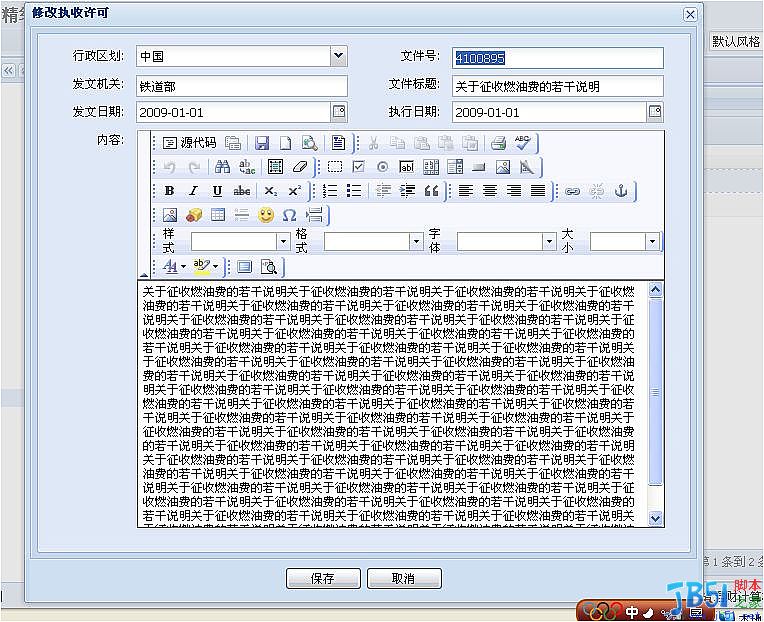
extjs fckeditor集成代码
{
xtype : "textarea",
name : "content",
anchor : '97%',
height : 400,
id : "content",
fieldLabel : "内容",
listeners : {
"render" : function(f) {
fckEditor = new FCKeditor("content");
fckEditor.Height = 400;
fckEditor.Width = 530;
fckEditor.BasePath = "/test/fckeditor/";
fckEditor.Config['CustomConfigurationsPath'] = "/fckeditor/fckconfig.js"
fckEditor.ReplaceTextarea();
}
}
}
相关推荐
-
javascript fckeditor编辑器取值与赋值实现代码
获取编辑器中HTML内容 复制代码 代码如下: function getEditorHTMLContents(EditorName) { var oEditor = FCKeditorAPI.GetInstance(EditorName); return(oEditor.GetXHTML(true)); } 获取编辑器中文字内容 复制代码 代码如下: function getEditorTextContents(EditorName) { var oEditor = FCKeditorAPI.G
-
Js FCKeditor的值获取和修改的代码小结
利用Javascript取和设FCKeditor值也是非常容易的,如下: // 获取编辑器中HTML内容 function getEditorHTMLContents(EditorName) { var oEditor = FCKeditorAPI.GetInstance(EditorName); return(oEditor.GetXHTML(true)); } // 获取编辑器中文字内容 function getEditorTextContents(EditorName) { var oEd
-
JSP 页面中使用FCKeditor控件(js用法)
它可和PHP.JavaScript.ASP.ASP.NET.ColdFusion.Java.以及ABAP等不同的编程语言相结合."FCKeditor"名称中的"FCK" 是这个编辑器的作者的名字Frederico Caldeira Knabben的缩写. FCKeditor控件请到官方网站下载http://www.fckeditor.net,本例主要用到FCKeditor_2.6.3.zip.fckeditor-java-demo-2.4.1.zip.fckedit
-
jsp fckeditor 上传中文图片乱码问题的解决方法
经过我修改ConnectorServlet.java和SimpleUploaderServlet.java两个文件,重新生成fckeditor-java-2.3.jar包,要解决所有的乱码问题,有3部要修改1.修改Web容器的字符编码,如果Web容器用的是Tomcat,则修改conf/server.xml文件,在两个Connector中添加"URIEncoding="utf-8"",我这里用的是utf-8编码,所以修改成utf-8,若项目是gb2312编码,则设置为
-
javascript 获取FCKeditor内容
形式如: 复制代码 代码如下: varoEditor=FCKeditorAPI.GetInstance('content'); varcontent=oEditor.GetXHTML(true); ************************************************* 利用Javascript取和设FCKeditor值也是非常容易的,如下: 复制代码 代码如下: // 获取编辑器中HTML内容 function getEditorHTMLContents(Editor
-
JS集成fckeditor及判断内容是否为空的方法
本文实例讲述了JS集成fckeditor及判断内容是否为空的方法.分享给大家供大家参考,具体如下: <script type="text/javascript"> <!-- // Automatically calculates the editor base path based on the _samples directory. // This is usefull only for these samples. A real application shoul
-
fckeditor常用Js,获取fckeditor内容,统计fckeditor字数,向fckeditor写入指定代码
content相当于你例子中的FCKeditor1. 复制代码 代码如下: //获取格式化的编辑器内容 function getEditorContents(){ var oEditor = FCKeditorAPI.GetInstance("content"); alert(oEditor.GetXHTML(true)); } //向编辑器插入指定代码 function insertHTMLToEditor(codeStr){ var oEditor = FCKeditorAPI.G
-
FCKeditor提供了一个完整的JavaScript API
FCKeditor offers a complete JavaScript API so you can interact with it once the editor is loaded and running. FCKeditor提供了一个完整的JavaScript API(Application Public Interface),你可以利用这些API来处理FCK编辑器,只要它被加载完成或在正在运行中. Retrieving an editor instanceOnce loaded,
-
FCKEditor常用Js代码,获取FCK内容,统计FCK字数,向FCK写入指定代码
content相当于你例子中的FCKeditor1. 复制代码 代码如下: //获取格式化的编辑器内容 function getEditorContents(){ var oEditor = FCKeditorAPI.GetInstance("content"); alert(oEditor.GetXHTML(true)); } //向编辑器插入指定代码 function insertHTMLToEditor(codeStr){ var oEditor = FCKeditorAPI.G
-
FCKeditorAPI 手册 js操作获取等
复制代码 代码如下: function abc() { var checkContent =FCKeditorAPI.GetInstance("editor");//获取实例 alert(checkContent.GetXHTML());//获取当前内容 var newelement = document.createElement("a"); newelement.href="#"; newelement.innerHTML="df&
-
js判断FCKeditor内容是否为空的两种形式
形式1: 复制代码 代码如下: function checkFCK(key) { var oEditor=FCKeditorAPI.GetInstance(key); var content=oEditor.GetXHTML(true); content=content.replace(/ /g,""); content=content.replace(/\s/g,""); content=content.replace(/ /g,""); co
随机推荐
- git eclipse 插件的安装
- vue组件Prop传递数据的实现示例
- JavaScript结合PHP实现网页制作中双下拉菜单的动态实现
- Javascript简单实现面向对象编程继承实例代码
- javascript 判断当前浏览器版本并判断ie版本
- 引用其它js时如何同时处理多个window.onload事件
- Go语言服务器开发之简易TCP客户端与服务端实现方法
- Android 屏幕切换监听的实例代码
- Android帧动画、补间动画、属性动画用法详解
- MySQL 数据库对服务器端光标的限制
- MySQL 相关的环境变量
- JS功能代码集锦
- Mac下MySQL初始化密码操作
- JQuery 学习笔记01 JQuery初接触
- jQuery实现的fixedMenu下拉菜单效果代码
- linux常用disk磁盘操作命令整理
- ServletContext读取web资源_动力节点Java学院整理
- android 电话状态监听(来电和去电)实现代码
- InputFilter实现EditText文本输入过滤器实例代码解析
- strcat函数实现简单示例