
BeautifulSoup中find和find_all的使用详解
爬虫利器BeautifulSoup中find和find_all的使用方法
二话不说,先上段HTML例子
<html>
  <head>
    <title>
      index
    </title>
  </head>
  <body>
     <div>
        <ul>
           <li id="flask"class="item-0"><a href="link1.html" rel="external nofollow" rel="external nofollow" rel="external nofollow" rel="external nofollow" rel="external nofollow" >first item</a></li>
          <li class="item-1"><a href="link2.html" rel="external nofollow" rel="external nofollow" rel="external nofollow" rel="external nofollow" rel="external nofollow" rel="external nofollow" >second item</a></li>
          <li class="item-inactie"><a href="link3.html" rel="external nofollow" rel="external nofollow" rel="external nofollow" >third item</a></li>
          <li class="item-1"><a href="link4.html" rel="external nofollow" rel="external nofollow" rel="external nofollow" rel="external nofollow" >fourth item</a></li>
          <li class="item-0"><a href="link5.html" rel="external nofollow" rel="external nofollow" rel="external nofollow" >fifth item</a>
         </ul>
     </div>
    <li> hello world </li>
  </body>
</html>
使用BeautifulSoup前需要先构建BeautifulSoup实例
# 构建beautifulsoup实例
soup = BeautifulSoup(html,'lxml')
# 第一个参数是要匹配的内容
# 第二个参数是beautifulsoup要采用的模块,即规则
需要注意的是,导入对的模块需要事先安装,此处导入的LXML事先已经安装。可以导入的模块可通过查询BeautifulSoup的文档查看
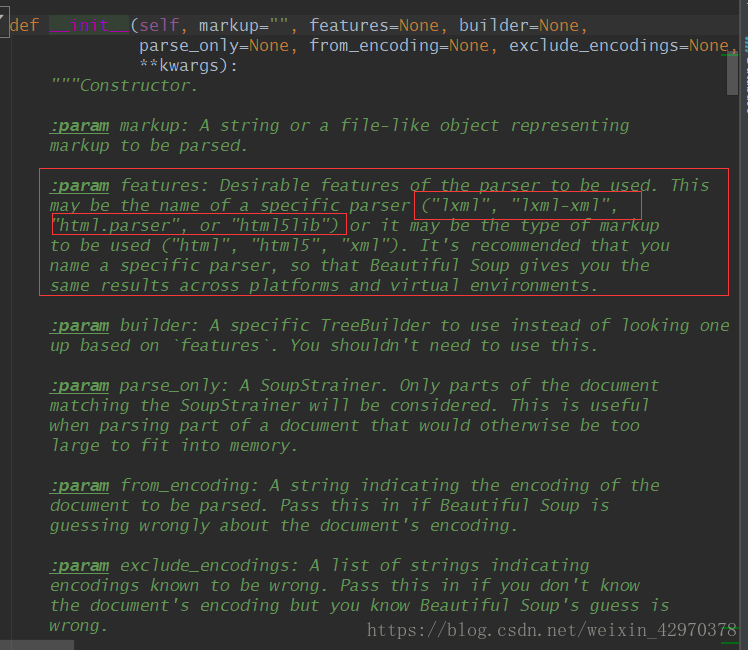
接下来是find和find_all的介绍
1. find
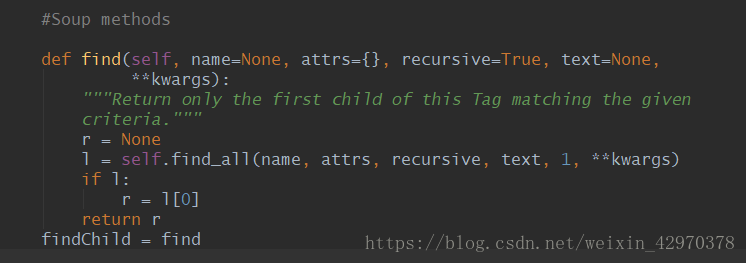
只返回第一个匹配到的对象
语法:
find(name, attrs, recursive, text, **wargs)
# recursive 递归的,循环的
参数:
| 参数名 | 作用 |
|---|---|
| name | 查找标签 |
| text | 查找文本 |
| attrs | 基于attrs参数 |
例子:
# find查找一次
li = soup.find('li')
print('find_li:',li)
print('li.text(返回标签的内容):',li.text)
print('li.attrs(返回标签的属性):',li.attrs)
print('li.string(返回标签内容为字符串):',li.string)
运行结果:
find_li: <li class="item-0" id="flask"><a href="link1.html" rel="external nofollow" rel="external nofollow" rel="external nofollow" rel="external nofollow" rel="external nofollow" >first item</a></li>
li.text(返回标签的内容): first item
li.attrs(返回标签的属性): {'id': 'flask', 'class': ['item-0']}
li.string(返回标签内容为字符串): first item
find也可以通过‘属性=值'的方法进行匹配
li = soup.find(id = 'flask')
print(li,'\n')
<li class="item-0" id="flask"><a href="link1.html" rel="external nofollow" rel="external nofollow" rel="external nofollow" rel="external nofollow" rel="external nofollow" >first item</a></li>
需要注意的是,因为class是python的保留关键字,若要匹配标签内class的属性,需要特殊的方法,有以下两种:
- 在attrs属性用字典的方式进行参数传递
- BeautifulSoup自带的特别关键字class_
# 第一种:在attrs属性用字典进行传递参数
find_class = soup.find(attrs={'class':'item-1'})
print('findclass:',find_class,'\n')
# 第二种:BeautifulSoup中的特别关键字参数class_
beautifulsoup_class_ = soup.find(class_ = 'item-1')
print('BeautifulSoup_class_:',beautifulsoup_class_,'\n')
运行结果
findclass: <li class="item-1"><a href="link2.html" rel="external nofollow" rel="external nofollow" rel="external nofollow" rel="external nofollow" rel="external nofollow" rel="external nofollow" >second item</a></li>
BeautifulSoup_class_: <li class="item-1"><a href="link2.html" rel="external nofollow" rel="external nofollow" rel="external nofollow" rel="external nofollow" rel="external nofollow" rel="external nofollow" >second item</a></li>
2. find_all
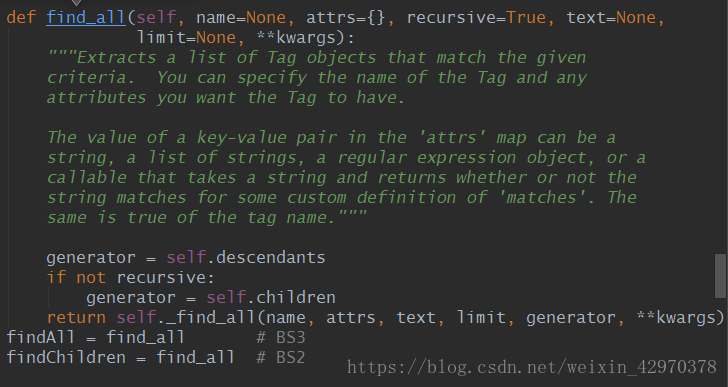
返回所有匹配到的结果,区别于find(find只返回查找到的第一个结果)
语法:
find_all(name, attrs, recursive, text, limit, **kwargs)
| 参数名 | 作用 |
|---|---|
| name | 查找标签 |
| text | 查找文本 |
| attrs | 基于attrs参数 |
与find一样的语法
上代码
# find_all 查找所有
li_all = soup.find_all('li')
for li_all in li_all:
	print('---')
	print('匹配到的li:',li_all)
	print('li的内容:',li_all.text)
	print('li的属性:',li_all.attrs)
运行结果:
---
匹配到的li: <li class="item-0" id="flask"><a href="link1.html" rel="external nofollow" rel="external nofollow" rel="external nofollow" rel="external nofollow" rel="external nofollow" >first item</a></li>
li的内容: first item
li的属性: {'id': 'flask', 'class': ['item-0']}
---
匹配到的li: <li class="item-1"><a href="link2.html" rel="external nofollow" rel="external nofollow" rel="external nofollow" rel="external nofollow" rel="external nofollow" rel="external nofollow" >second item</a></li>
li的内容: second item
li的属性: {'class': ['item-1']}
---
匹配到的li: <li cvlass="item-inactie"><a href="link3.html" rel="external nofollow" rel="external nofollow" rel="external nofollow" >third item</a></li>
li的内容: third item
li的属性: {'cvlass': 'item-inactie'}
---
匹配到的li: <li class="item-1"><a href="link4.html" rel="external nofollow" rel="external nofollow" rel="external nofollow" rel="external nofollow" >fourth item</a></li>
li的内容: fourth item
li的属性: {'class': ['item-1']}
---
匹配到的li: <li class="item-0"><a href="link5.html" rel="external nofollow" rel="external nofollow" rel="external nofollow" >fifth item</a>
</li>
li的内容: fifth item
附上比较灵活的find_all查询方法:
# 最灵活的使用方式
li_quick = soup.find_all(attrs={'class':'item-1'})
for li_quick in li_quick:
	print('最灵活的查找方法:',li_quick)
运行结果:
- 最灵活的查找方法: <li class="item-1"><a href="link2.html" rel="external nofollow" rel="external nofollow" rel="external nofollow" rel="external nofollow" rel="external nofollow" rel="external nofollow" >second item</a></li>
- 最灵活的查找方法: <li class="item-1"><a href="link4.html" rel="external nofollow" rel="external nofollow" rel="external nofollow" rel="external nofollow" >fourth item</a></li>
完整代码:
# coding=utf8
# @Author= CaiJunxuan
# @QQ=469590490
# @Wechat:15916454524

# beautifulsoup

# 导入beautifulsoup模块
from bs4 import BeautifulSoup

# HTML例子
html = '''
<html>
  <head>
    <title>
      index
    </title>
  </head>
  <body>
     <div>
        <ul>
           <li id="flask"class="item-0"><a href="link1.html" rel="external nofollow" rel="external nofollow" rel="external nofollow" rel="external nofollow" rel="external nofollow" >first item</a></li>
          <li class="item-1"><a href="link2.html" rel="external nofollow" rel="external nofollow" rel="external nofollow" rel="external nofollow" rel="external nofollow" rel="external nofollow" >second item</a></li>
          <li cvlass="item-inactie"><a href="link3.html" rel="external nofollow" rel="external nofollow" rel="external nofollow" >third item</a></li>
          <li class="item-1"><a href="link4.html" rel="external nofollow" rel="external nofollow" rel="external nofollow" rel="external nofollow" >fourth item</a></li>
          <li class="item-0"><a href="link5.html" rel="external nofollow" rel="external nofollow" rel="external nofollow" >fifth item</a>
         </ul>
     </div>
    <li> hello world </li>
  </body>
</html>
'''

# 构建beautifulsoup实例
soup = BeautifulSoup(html,'lxml')
# 第一个参数是要匹配的内容
# 第二个参数是beautifulsoup要采用的模块,即规则
# html.parser是python内置的结构匹配方法,但是效率不如lxml所以不常用
# lxml 采用lxml模块
# html5lib,该模块可以将内容转换成html5对象
# 若想要以上功能,就需要具备对应的模块,比如使用lxml就要安装lxml

# 在bs4当中有很多种匹配方法,但常用有两种:

# find查找一次
li = soup.find('li')
print('find_li:',li)
print('li.text(返回标签的内容):',li.text)
print('li.attrs(返回标签的属性):',li.attrs)
print('li.string(返回标签内容为字符串):',li.string)
print(50*'*','\n')

# find可以通过'属性 = 值'的方法进行select
li = soup.find(id = 'flask')
print(li,'\n')
# 因为class是python的保留关键字,所以无法直接查找class这个关键字
# 有两种方法可以进行class属性查询
# 第一种:在attrs属性用字典进行传递参数
find_class = soup.find(attrs={'class':'item-1'})
print('findclass:',find_class,'\n')
# 第二种:BeautifulSoup中的特别关键字参数class_
beautifulsoup_class_ = soup.find(class_ = 'item-1')
print('BeautifulSoup_class_:',beautifulsoup_class_,'\n')

# find_all 查找所有
li_all = soup.find_all('li')
for li_all in li_all:
	print('---')
	print('匹配到的li:',li_all)
	print('li的内容:',li_all.text)
	print('li的属性:',li_all.attrs)

# 最灵活的使用方式
li_quick = soup.find_all(attrs={'class':'item-1'})
for li_quick in li_quick:
	print('最灵活的查找方法:',li_quick)
到此这篇关于BeautifulSoup中find和find_all的使用详解的文章就介绍到这了,更多相关BeautifulSoup find和find_all内容请搜索我们以前的文章或继续浏览下面的相关文章希望大家以后多多支持我们!
相关推荐
-
python BeautifulSoup使用方法详解
直接看例子: 复制代码 代码如下: #!/usr/bin/python# -*- coding: utf-8 -*-from bs4 import BeautifulSouphtml_doc = """<html><head><title>The Dormouse's story</title></head><body><p class="title"><b>T
-
python 解析html之BeautifulSoup
复制代码 代码如下: # coding=utf-8 from BeautifulSoup import BeautifulSoup, Tag, NavigableString from SentenceSpliter import SentenceSpliter from os.path import basename,dirname,isdir,isfile from os import makedirs from shutil import copyfile import io import
-
Python爬虫beautifulsoup4常用的解析方法总结
摘要 如何用beautifulsoup4解析各种情况的网页 beautifulsoup4的使用 关于beautifulsoup4,官网已经讲的很详细了,我这里就把一些常用的解析方法做个总结,方便查阅. 装载html文档 使用beautifulsoup的第一步是把html文档装载到beautifulsoup中,使其形成一个beautifulsoup对象. import requests from bs4 import BeautifulSoup url = "http://new.qq.com/o
-
python3第三方爬虫库BeautifulSoup4安装教程
Python3安装第三方爬虫库BeautifulSoup4,供大家参考,具体内容如下 在做Python3爬虫练习时,从网上找到了一段代码如下: #使用第三方库BeautifulSoup,用于从html或xml中提取数据 from bs4 import BeautifulSoup 自己实践后,发现出现了错误,如下所示: 以上错误提示是说没有发现名为"bs4"的模块.即"bs4"模块未安装. 进入Python安装目录,以作者IDE为例, 控制台提示第三
-
使用BeautifulSoup爬虫程序获取百度搜索结果的标题和url示例
熟悉Java的jsoup包的话,对于Python的BeautifulSoup库应该很容易上手. 复制代码 代码如下: #coding: utf-8import sysimport urllibimport urllib2from BeautifulSoup import BeautifulSoup question_word = "吃货 程序员"url = "http://www.baidu.com/s?wd=" + urllib.quote(question_wo
-
python基于BeautifulSoup实现抓取网页指定内容的方法
本文实例讲述了python基于BeautifulSoup实现抓取网页指定内容的方法.分享给大家供大家参考.具体实现方法如下: # _*_ coding:utf-8 _*_ #xiaohei.python.seo.call.me:) #win+python2.7.x import urllib2 from bs4 import BeautifulSoup def jd(url): page = urllib2.urlopen(url) html_doc = page.read() soup = B
-
python利用beautifulSoup实现爬虫
以前讲过利用phantomjs做爬虫抓网页 http://www.jb51.net/article/55789.htm 是配合选择器做的 利用 beautifulSoup(文档 :http://www.crummy.com/software/BeautifulSoup/bs4/doc/)这个python模块,可以很轻松的抓取网页内容 # coding=utf-8 import urllib from bs4 import BeautifulSoup url ='http://www.baidu.
-
Python BeautifulSoup中文乱码问题的2种解决方法
解决方法一: 使用python的BeautifulSoup来抓取网页然后输出网页标题,但是输出的总是乱码,找了好久找到解决办法,下面分享给大家首先是代码 复制代码 代码如下: from bs4 import BeautifulSoupimport urllib2 url = 'http://www.jb51.net/'page = urllib2.urlopen(url) soup = BeautifulSoup(page,from_encoding="utf8")print soup
-

BeautifulSoup中find和find_all的使用详解
爬虫利器BeautifulSoup中find和find_all的使用方法 二话不说,先上段HTML例子 <html> <head> <title> index </title> </head> <body> <div> <ul> <li id="flask"class="item-0"><a href="link1.html" rel
-
C++ 中const修饰虚函数实例详解
C++ 中const修饰虚函数实例详解 [1]程序1 #include <iostream> using namespace std; class Base { public: virtual void print() const = 0; }; class Test : public Base { public: void print(); }; void Test::print() { cout << "Test::print()" << end
-
AngularJS中使用three.js的实例详解
AngularJS中使用three.js的实例详解 一.轨迹球的引入问题 一开始我是用下面的方式引如轨迹球,但是会报Trackballcontrols is undefined的错. import * as THREE from 'three'; import * as Trackballcontrols from 'three'; 但其实我是能够在node_module下的threejs的包中找到Trackballcontrols的文件的,我一开始以为是引用的路径没对然后修改路径到对应包下Tr
-
IOS 中CALayer绘制图片的实例详解
IOS 中CALayer绘制图片的实例详解 CALayer渲染内容图层.与UIImageView相比,不具有事件响应功能,且UIImageView是管理内容. 注意事项:如何使用delegate对象执行代理方法进行绘制,切记需要将delegate设置为nil,否则会导致异常crash. CALayer绘制图片与线条效果图: 代码示例: CGPoint position = CGPointMake(160.0, 200.0); CGRect bounds = CGRectMake(0.0, 0.0
-
基于python中staticmethod和classmethod的区别(详解)
例子 class A(object): def foo(self,x): print "executing foo(%s,%s)"%(self,x) @classmethod def class_foo(cls,x): print "executing class_foo(%s,%s)"%(cls,x) @staticmethod def static_foo(x): print "executing static_foo(%s)"%x a=A(
-
JSP 中request与response的用法详解
JSP 中request与response的用法详解 概要: 在学习这两个对象之前,我们应该已经有了http协议的基本了解了,如果不清楚http协议的可以看我的关于http协议的介绍.因为其实request和response的使用大部分都是对http协议的操作. request对象的介绍 我们先从request对象进行介绍: 我们知道http协议定义了请求服务器的格式: 请求行 请求头 空格 请求体(get请求没有请求体) 好了,这里我们就不详细介绍了,我们只看几个应用就可以了,没什么难度: 应
-
vue中v-model动态生成的实例详解
vue中v-model动态生成的实例详解 前言: 最近在做公司的项目中,有这么一个需求,每一行有一个input和一个select,其中行数是根据服务器返回的json数据动态变化的.那么问题来了,我们要怎样动态生成v-model? 现在项目做完了就整理了一下,直接贴代码了. <!DOCTYPE html> <html> <head> <meta charset="UTF-8"> <title></title> <
-
PHP中的函数声明与使用详解
函数 1. 函数名是标识符之一,只能有字母数字下划线,开头不能是数字: 函数名的命名,必须符合"小驼峰法则"FUNC(),func(),Func(); 函数名不区分大小写; 函数名不能与已有函数同名,不能与内置函数名同名: 2. function_exists("func");用于检测函数是否已经声明: 注意传入的函数名,必须是字符串格式,返回结果为true/false: echo打印时,true为1,false不显示: [ph
-
JavaScript 中有关数组对象的方法(详解)
JS 处理数组多种方法 js 中的数据类型分为两大类:原始类型和对象类型. 原始类型包括:数值.字符串.布尔值.null.undefined 对象类型包括:对象即是属性的集合,当然这里又两个特殊的对象----函数(js中的一等对象).数组(键值的有序集合). 数组元素的添加 arrayObj.push([item1 [item2 [. . . [itemN ]]]]); 将一个或多个新元素添加到数组结尾,并返回数组新长度 arrayObj.unshift([item1 [item2 [. . .
-
Linux 中常用的Rpm命令实例详解
rpm命令是RPM软件包的管理工具.rpm原本是Red Hat Linux发行版专门用来管理Linux各项套件的程序,由于它遵循GPL规则且功能强大方便,因而广受欢迎.逐渐受到其他发行版的采用.RPM套件管理方式的出现,让Linux易于安装,升级,间接提升了Linux的适用度. 语法 rpm(选项)(参数) 选项 -a:查询所有套件: -b<完成阶段><套件档>+或-t <完成阶段><套件档>+:设置包装套件的完成阶段,并指定套件档的文件名称: -c:只列出