
springSecurity之AuthenticationProvider用法解析
目录
- AuthenticationProvider解析
- 从源码中可以看到
- 总结
AuthenticationProvider解析
首先进入到AuthenticationProvider源码中可以看到它只是个简单的接口里面也只有两个方法:
public interface AuthenticationProvider {
	// 具体认证流程
	Authentication authenticate(Authentication authentication)
			throws AuthenticationException;
    // supports函数用来指明该Provider是否适用于该类型的认证,如果不合适,则寻找另一个Provider进行验证处理。
	boolean supports(Class<?> authentication);
}
AuthenticationProvider是用户自定义身份认证,认证流程顶级接口。
唯一作用即使用来进行身份验证,同时springSecurity也为我们提供了很多方便的实现类。
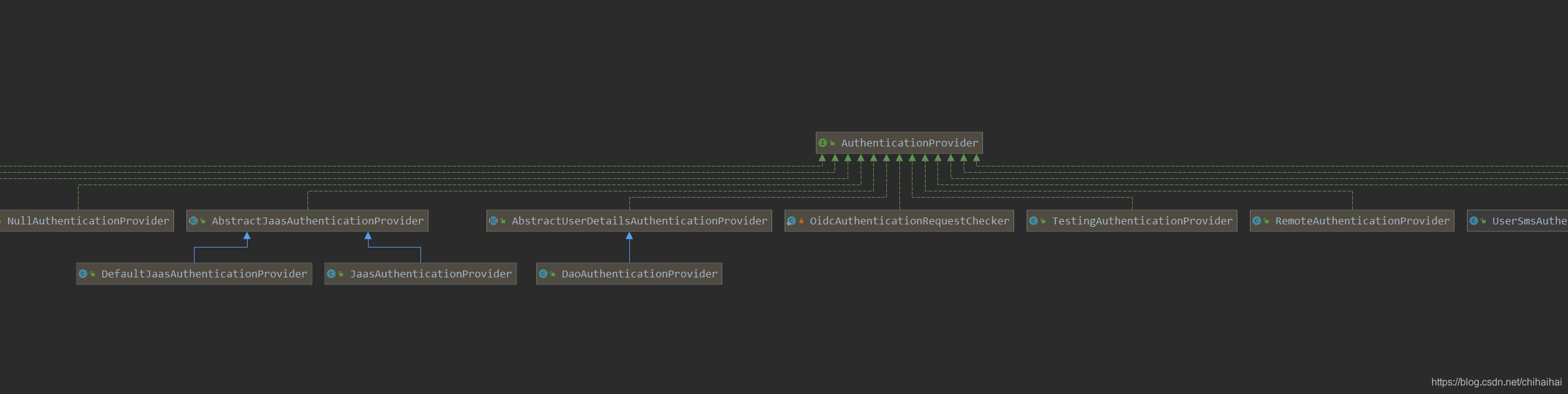
当我们没有指定相关AuthenticationProvider 对象时springSecurity默认使用的就时上图中的DaoAuthenticationProvider进行验证。
也就是最常见的账户名密码的方式。但是实际开发中我们往往需要实现自定义认证流程比如最常见的短信验证码,第三方登录等等。
这个时候我们就可以通过实现自己的 AuthenticationProvider方式来进行自定义认证。
只需要在WebSecurityConfigurerAdapter适配器类的config方法中加入自己实现的AuthenticationProvider 即可。
 @Override
    protected void configure(AuthenticationManagerBuilder auth) {
        auth.authenticationProvider(authenticationProvider());
    }
说到AuthenticationProvider就离不开AuthenticationManager这个接口
public interface AuthenticationManager {
	Authentication authenticate(Authentication authentication)
			throws AuthenticationException;
}
同样的AuthenticationManager也是一个顶级接口,可以看到它其中也定义了一个跟AuthenticationProvider一摸一样的方法。
如果说Auth ntic ationProvider是对认证的具体实现,则AuthenticationManager则是对我们众多AuthenticationProvider的一个统一管理。
Authentication Ma nager的实现有很多,通常使用ProviderManager对认证请求链进行管理。
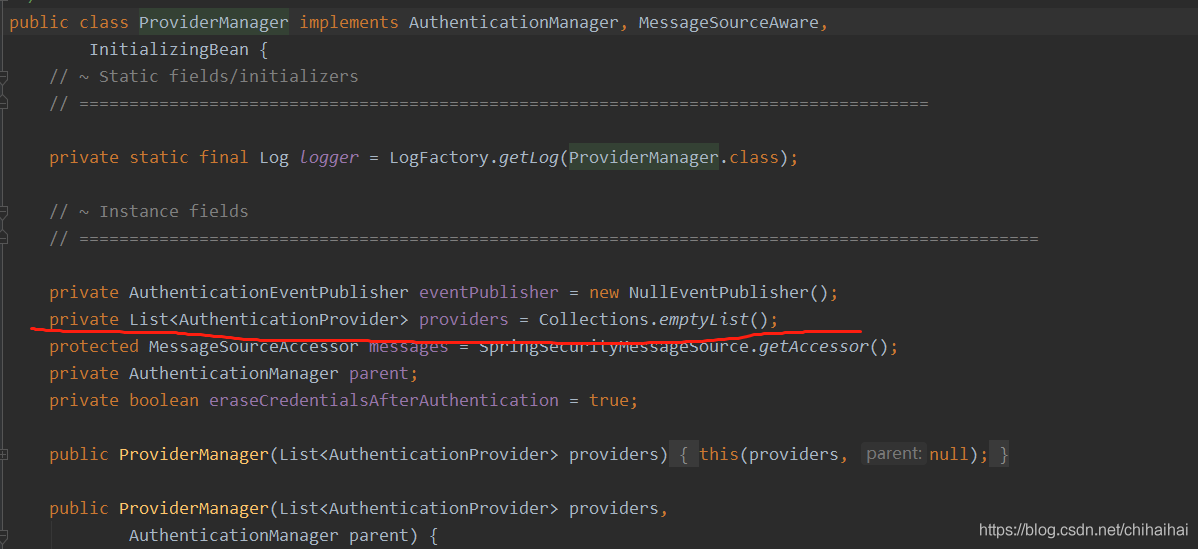
从源码中可以看到
ProviderManager提供了一个list对AuthenticationProvider进行统一管理,即一个认证处理器链来支持同一个应用中的多个不同身份认证机制,ProviderManager将会根据顺序来进行验证。
public Authentication authenticate(Authentication authentication)
			throws AuthenticationException {
		Class<? extends Authentication> toTest = authentication.getClass();
		AuthenticationException lastException = null;
		AuthenticationException parentException = null;
		Authentication result = null;
		Authentication parentResult = null;
		boolean debug = logger.isDebugEnabled();

		for (AuthenticationProvider provider : getProviders()) {
			// 如果支持认证实现类就继续处理
			if (!provider.supports(toTest)) {
				continue;
			}

			if (debug) {
				logger.debug("Authentication attempt using "
						+ provider.getClass().getName());
			}

			try {
			  // 调用实现类的authenticate方法进行真实业务逻辑认证处理
				result = provider.authenticate(authentication);

				if (result != null) {
					copyDetails(authentication, result);
					break;
				}
			}
			catch (AccountStatusException e) {
				prepareException(e, authentication);
				// SEC-546: Avoid polling additional providers if auth failure is due to
				// invalid account status
				throw e;
			}
			catch (InternalAuthenticationServiceException e) {
				prepareException(e, authentication);
				throw e;
			}
			catch (AuthenticationException e) {
				lastException = e;
			}
		}

		if (result == null && parent != null) {
			// Allow the parent to try.
			try {
				result = parentResult = parent.authenticate(authentication);
			}
			catch (ProviderNotFoundException e) {
				// ignore as we will throw below if no other exception occurred prior to
				// calling parent and the parent
				// may throw ProviderNotFound even though a provider in the child already
				// handled the request
			}
			catch (AuthenticationException e) {
				lastException = parentException = e;
			}
		}

		if (result != null) {
			if (eraseCredentialsAfterAuthentication
					&& (result instanceof CredentialsContainer)) {
				// Authentication is complete. Remove credentials and other secret data
				// from authentication
				((CredentialsContainer) result).eraseCredentials();
			}

			// If the parent AuthenticationManager was attempted and successful than it will publish an AuthenticationSuccessEvent
			// This check prevents a duplicate AuthenticationSuccessEvent if the parent AuthenticationManager already published it
			if (parentResult == null) {
			  //  //发送认证成功事件
				eventPublisher.publishAuthenticationSuccess(result);
			}
			return result;
		}

		// Parent was null, or didn't authenticate (or throw an exception).

		if (lastException == null) {
			lastException = new ProviderNotFoundException(messages.getMessage(
					"ProviderManager.providerNotFound",
					new Object[] { toTest.getName() },
					"No AuthenticationProvider found for {0}"));
		}

		// If the parent AuthenticationManager was attempted and failed than it will publish an AbstractAuthenticationFailureEvent
		// This check prevents a duplicate AbstractAuthenticationFailureEvent if the parent AuthenticationManager already published it
		if (parentException == null) {
			prepareException(lastException, authentication);
		}

		throw lastException;
	}
总结
以上为个人经验,希望能给大家一个参考,也希望大家多多支持我们。
相关推荐
-
详解spring security 配置多个AuthenticationProvider
前言 发现很少关于spring security的文章,基本都是入门级的,配个UserServiceDetails或者配个路由控制就完事了,而且很多还是xml配置,国内通病...so,本文里的配置都是java配置,不涉及xml配置,事实上我也不会xml配置 spring security的大体介绍 spring security本身如果只是说配置,还是很简单易懂的(我也不知道网上说spring security难,难在哪里),简单不需要特别的功能,一个WebSecurityConfigurerA
-
Spring Security认证的完整流程记录
目录 前言 认证上下文的持久化 认证信息的封装 查找处理认证的 Provider 类 认证逻辑 总结 前言 本文以用户名/密码验证方式为例,讲解 Spring Security 的认证流程,在此之前,需要你了解 Spring Security 用户名/密码认证的基本配置. Spring Security 是基于过滤器的,通过一层一层的过滤器,处理认证的流程,拦截非法请求. 认证上下文的持久化 处于最前面的过滤器叫做 SecurityContextPersistenceFilter,Spring
-
Java中的Spring Security配置过滤器
目录 AbstractAuthenticationFilterConfigurer 改造过程 配置类效果 前言: CaptchaAuthenticationFilter是通过模仿UsernamePasswordAuthenticationFilter实现的.同样的道理,由于UsernamePasswordAuthenticationFilter的配置是由FormLoginConfigurer来完成的,应该也能模仿一下FormLoginConfigurer,写一个配置类CaptchaAuthent
-
springSecurity之AuthenticationProvider用法解析
目录 AuthenticationProvider解析 从源码中可以看到 总结 AuthenticationProvider解析 首先进入到AuthenticationProvider源码中可以看到它只是个简单的接口里面也只有两个方法: public interface AuthenticationProvider { // 具体认证流程 Authentication authenticate(Authentication authentication) throws Authenticatio
-
mysql having用法解析
having的用法 having字句可以让我们筛选成组后的各种数据,where字句在聚合前先筛选记录,也就是说作用在group by和having字句前.而 having子句在聚合后对组记录进行筛选. SQL实例: 一.显示每个地区的总人口数和总面积. SELECT region, SUM(population), SUM(area) FROM bbc GROUP BY region 先以region把返回记录分成多个组,这就是GROUP BY的字面含义.分完组后,然后用聚合函数对每组中 的不同
-
sql中的 where 、group by 和 having 用法解析
废话不多说了,直接给大家贴代码了,具体代码如下所示: --sql中的 where .group by 和 having 用法解析 --如果要用到group by 一般用到的就是"每这个字" 例如说明现在有一个这样的表:每个部门有多少人 就要用到分组的技术 select DepartmentID as '部门名称',COUNT(*) as '个数' from BasicDepartment group by DepartmentID --这个就是使用了group by +字段 进行了分组
-
Java Thread多线程详解及用法解析
最全面的java多线程用法解析,如果你对Java的多线程机制并没有深入的研究,那么本文可以帮助你更透彻地理解Java多线程的原理以及使用方法. 1.创建线程 在Java中创建线程有两种方法:使用Thread类和使用Runnable接口.在使用Runnable接口时需要建立一个Thread实例.因此,无论是通过Thread类还是Runnable接口建立线程,都必须建立Thread类或它的子类的实例.Thread构造函数: public Thread( ); public Thread(Runnab
-

Thinkphp 中 distinct 的用法解析
TP中distinct()的用处主要是去除重复的值 在Thinkphp手册中也详细说明了(链接:http://document.thinkphp.cn/manual_3_2.html#distinct) 下面是我的个人例子: 显示的是这样的 在加入distinct的话: 显示结果为 下面为贴出来的代码 $offernum = M('offer')->distinct(true)->where('order_id='.$order_id)->field('user_id,number')-
-
Python random模块用法解析及简单示例
用法示例: import random # 1)随机小数 print(random.random()) # 获取大于0且小于1 之间的小数 random.random() print(random.uniform(1, 4)) # 获取大于1小于3的小数 # 2)随机整数 print(random.randint(1, 9)) # 获取大于等于1且小于等于9之间的整数 print(random.randrange(1, 9)) # 获取大于等于1且小于9之间的整数 print(random.ra
-
es6新特性之 class 基本用法解析
javaScript 语言中,生成实例对象的传统方法是通过构造函数,与传统的面向对象语言(比如 C++ 和 Java)差异很大,ES6 提供了更接近传统语言的写法,引入了 class(类)这个概念,作为对象的模板.通过class关键字,可以定义类. es6 class 与es5的面向对象的区别: 1. 写法不同,使用关键字class 2.当new一个实例,默认有一个constructor方法,且默认返回实例对象(this),也可以返回另一对象 3.类的所有方法都在prototype属性上,但是不
-
Java String的intern用法解析
这篇文章主要介绍了Java String的intern用法解析,文中通过示例代码介绍的非常详细,对大家的学习或者工作具有一定的参考学习价值,需要的朋友可以参考下 在Java6中,intern方法返回的是对应字符串在永久态(方法区)中的地址:Java7以后,intern方法返回的是该字符串首次创建时候的堆内存的地址: 在java7中: package com.ecarx.daa.data.manager.utils; public class StringTest { public static
-
Java内存分配多种情况的用法解析
这篇文章主要介绍了Java内存分配多种情况的用法解析,文中通过示例代码介绍的非常详细,对大家的学习或者工作具有一定的参考学习价值,需要的朋友可以参考下 Java内存五大区 栈:用于保存函数内部的局部变量,函数形参,一旦超出作用域,就删除 堆:凡是new出来的东西都是存放在堆里,也可以说可变对象(非基本数据类型)都是保存在这里面. 堆里面的东西,都有一个内存(16进制),栈中存放的就是这个16进制的内存值. 堆里面存放的东西都用默认值: 整数:默认值0 浮点数:默认0.0 布尔:默认false 字
-
Java图形界面Swing原理及用法解析
这篇文章主要介绍了Java图形界面Swing原理及用法解析,文中通过示例代码介绍的非常详细,对大家的学习或者工作具有一定的参考学习价值,需要的朋友可以参考下 JButton组件 布局管理器 FlowLayout 流式布局 BorderLayout 方位布局 GridLayout 表格布局 绝对布局 JLable 组件 文本框组件 JPanel轻量级容器 创建事件监听类 (更换监听类实现监听) 窗口监听适配器 都可使用匿名类实现监听 每个监听方法都可以返回一个Event对象来返回监听值 以上就是本